On-device AI
The Ollama + OpenWebUI stack accelerated in Vulkan on the BC-250's GPU.
SkillFishOS includes a local AI stack: chat and coding models that run entirely on the BC-250’s GPU, with no cloud and without sending data anywhere. It turns on and off with one click, so you free up GPU and RAM when you want to play.
Why Vulkan and not ROCm
AMD’s “official” compute stack is ROCm, but it does not support the BC-250’s gfx1013. SkillFishOS therefore uses the Vulkan backend of Ollama, with the Mesa drivers: it works well on the integrated GPU, leveraging the shared memory (and the extended GTT, see GPU).
The components
| Component | Role |
|---|---|
| Ollama (Vulkan backend) | runs the LLM models on the GPU |
| OpenWebUI | web chat interface (with web search) |
| Dockge | Docker stack management via web |
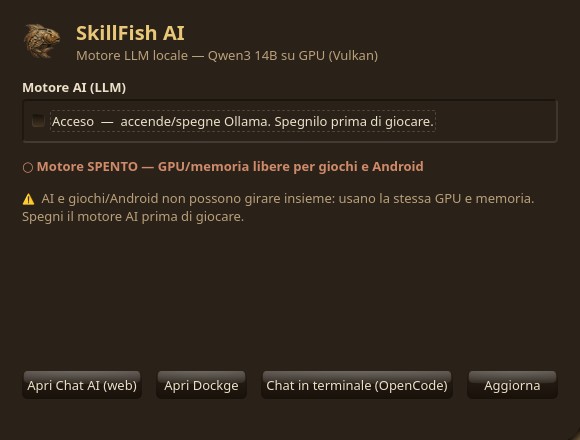
The stack runs in Docker containers with a custom image (Ollama + Mesa’s Vulkan drivers). It is configured not to start on its own (restart: "no"), so it doesn’t steal the GPU from games: you activate it when needed.
The recommended model
The practical reference model is qwen3:14b: it runs 100% on the GPU (~10.7 GB) with the KV cache in f16.
⚠️ On this hardware (RADV driver) the
q4_0quantization of the KV cache corrupts the output: use the f16 cache.
Turning it on/off
A dedicated AI panel (native app, see Native apps) turns the whole stack on and off with one click. Keep in mind:
- AI and games/Android should not be used together: they share the same GPU and memory;
- with the stack off, the GPU and RAM are fully available again for gaming.
Sources
- Ollama · OpenWebUI · Dockge
- Mesa / RADV (Vulkan driver)
- ROCm — supported hardware (
gfx1013is not listed)