
Локальний ШІ
Локальний рушій ШІ з прискоренням через Vulkan на графіці BC-250 — Unsloth Studio з моделями GGUF із Hugging Face.
SkillFishOS має в комплекті локальний ШІ: моделі для розмови й для коду, які працюють цілком на графіці BC-250, без хмари, нічого не надсилаючи назовні. Одне клацання вмикає й вимикає їх, тож графіка та пам’ять знову вільні, коли захочете грати.
Чому Vulkan, а не ROCm
«Офіційний» обчислювальний стек AMD — це ROCm, але він не підтримує gfx1013 із BC-250. Тому SkillFishOS користується бекендом Vulkan із драйверами Mesa/RADV: він повністю використовує вбудовану графіку й спільну пам’ять (із розширеним GTT, див. GPU).
Наскільки це важливо. Виміряно на платі з Qwen3-1.7B Q4_K_M:
| Лише процесор | Графіка через Vulkan | ||
|---|---|---|---|
| Генерування | 41,5 ток/с | 210,7 ток/с | 5,1× |
| Обробка запиту | 9,2 ток/с | 157,2 ток/с | 17× |
Рушій: Unsloth Studio
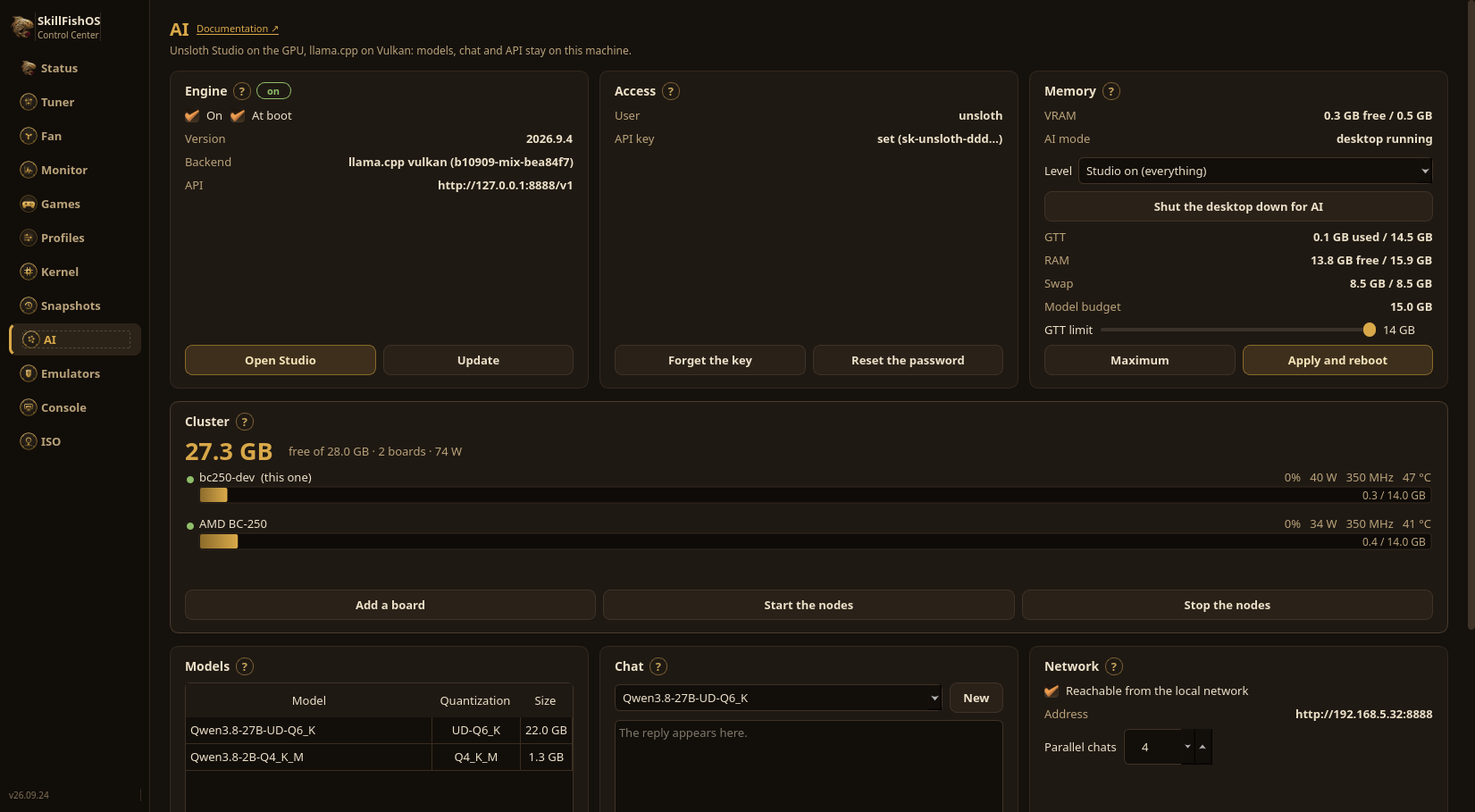
Від випуску 26.08 рушієм є Unsloth Studio, який замінив попередній набір Ollama + OpenWebUI у Docker. Це одна нативна служба, що дає і інтерфейс розмови, і сумісний з OpenAI API, слухаючи на 127.0.0.1:8888.
Що це змінює на практиці:
- Одна служба замість набору контейнерів. Раніше потрібно було три контейнери (Ollama, OpenWebUI, Dockge) плюс власний образ на ~6,5 ГБ; тепер це просто
skillfish-unsloth.service. - Моделі беруться з Hugging Face. Unsloth тягне файли GGUF просто з повного каталогу Hugging Face, а не з дібраного реєстру, тож набір доступних моделей і квантувань незрівнянно ширший — разом зі збірками, які публікує сама команда Unsloth.
- Сам собою він відповідає лише цій машині. Ззовні до нього дістаються через Remote Manager, який автентифікує через PAM. Якщо ви хочете, щоб він відповідав і іншим пристроям удома, у розділі ШІ є перемикач, який відкриває його локальній мережі, з власним користувачем і паролем.
Моделі
Моделі це файли GGUF з каталогу Hugging Face, і беруться вони з двох місць: із розділу ШІ в Control Center, де ви пишете назву репозиторію (наприклад unsloth/Qwen3-4B-GGUF) і вибираєте варіант зі списку з розмірами; або з Hub усередині Unsloth Studio, де є пошук і повні картки моделей.
Практичне правило на цій платі: 16 ГБ GDDR6 ділять система і GPU, тому краще лишатися нижче ~11 ГБ ваг, щоб решті вистачило місця.
Увімкнення, оновлення і ключ
Розділ ШІ в Control Center вмикає і вимикає рушій, вмикає його при запуску і показує версію з оновленням в один клік. Те саме є в Remote Manager, із браузера.
Unsloth створює випадковий пароль під час встановлення і вимикається сам через годину, якщо пароль не змінити. Цей крок робить розділ ШІ: ви вибираєте пароль Studio, і ключ API створюється разом із ним. Через ключ вікно і Remote Manager спілкуються з рушієм; моделі на диску, пам’ять (VRAM, GTT, RAM, swap) і проба чату з виміряними токенами за секунду поруч.
Майте на увазі:
- ШІ та ігри разом не працюють: вони ділять той самий GPU і ту саму пам’ять;
- з вимкненим рушієм GPU і RAM знову цілком вільні для ігор.
Більше пам’яті для моделі
Стільниця займає пам’ять, яку міг би використати модель. У розділі ШІ її вимикають, а також обирають, скільки вимкнути: Studio увімкнено, тобто сама стільниця; лише рушій, зі сторінкою; лише рушій, саме API, що лишає llama-server самого на порту 8888, з тим самим API і тим самим ключем. Виміряно на платі із завантаженою моделлю: 567 МБ системної пам’яті стають 115.
Від цієї миті машиною керують із Remote Manager на іншому комп’ютері або через ssh. Модель для голого рушія обирають заздалегідь, у тій самій картці.
Більше ніж одна плата
Кілька плат BC-250 ділять між собою модель, завелику для однієї. Картка Cluster перелічує плати, скільки пам’яті вони мають разом і скільки споживають, а також вмикає й вимикає вузли. 27B на 22 ГБ на одній платі навіть не завантажиться; на двох працює зі швидкістю 7,57 токена за секунду.
Саме для цього він і потрібен, і варто сказати прямо: швидше не буде. Модель, яка вміщалася в одну плату, втрачає близько третини швидкості після поділу, бо кожна межа між шарами йде мережею. Кластер для тих моделей, які самі взагалі не запускаються.
Джерела
- Unsloth · llama.cpp · Hugging Face
- Mesa / RADV (драйвер Vulkan)
- ROCm — підтримуване залізо (
gfx1013у списку немає)